If your WooCommerce store makes shoppers scroll through dozens of products to find what they need, you are leaving money on the table. Filter Everything PRO is a WordPress and WooCommerce filter plugin designed to fix exactly that, giving your customers fast, intuitive filtering so they find the right product in two or three clicks. It is available on CodeCanyon for a one-time $49 regular license, making it a strong alternative to costly recurring SaaS tools. Get Lifetime Deals
What is Filter Everything?
Filter Everything PRO is a WordPress plugin in the eCommerce and product filtering category, built by developer Stepasyuk on Envato’s CodeCanyon marketplace. It is designed for store owners, developers, and agencies who need a reliable, flexible way to let visitors filter products, posts, or any custom content on their WordPress site.
The core problem it solves is poor product discoverability. Without a proper filter, shoppers have to browse category pages manually or rely on a basic search bar, leading to high bounce rates and lost conversions. Filter Everything PRO replaces that friction with AJAX-powered, real-time filtering across any content type, whether that is WooCommerce products, blog posts, real estate listings, car directories, or custom post types.
It is consistently well-reviewed by verified users on G2’s WooCommerce software category, with over 15,000 sales and a 4.91-star rating on CodeCanyon from 306 reviews.
Key attributes at a glance:
- Filters any WordPress post type including WooCommerce products and custom post types
- AJAX-powered results with no page reload
- Built-in SEO tools with clean, indexable filter URLs
How Does Filter Everything Work?
Getting Filter Everything PRO up and running is straightforward even for non-developers. Here is the typical user flow:
- Purchase and install: Buy the plugin from CodeCanyon for $49, download the zip file, and install it via WordPress admin under Plugins > Add New > Upload Plugin.
- Create a Filter Set: Navigate to Filter Everything in your WordPress dashboard and create a new Filter Set. Assign it to the post type or archive page you want to filter (for example, a WooCommerce product category page).
- Add individual filters: Inside the Filter Set, add filters for the criteria you want, such as price range, product category, color attribute, brand, stock status, or any custom taxonomy or ACF field.
- Choose filter display styles: Set each filter’s visual type: checkboxes, radio buttons, dropdowns, range sliders, color swatches, or brand logo grids. Pick horizontal or vertical layout depending on your theme.
- Place the filter widget: Add the Filter Everything widget to your sidebar, or embed it with a shortcode on any page. Filtered results update instantly via AJAX, and the URL stays clean and SEO-friendly.
Tips for Using Filter Everything
Getting the most out of Filter Everything PRO comes down to a few smart configuration habits that most new users skip.
- Enable SEO Rules from day one. The plugin’s built-in SEO Rules engine lets you auto-generate unique meta titles and H1 headings for every filter combination page. Set this up before you start indexing or you will miss significant long-tail traffic opportunities.
- Use color swatches for visual attributes. For clothing or electronics stores, switching color and size filters from checkboxes to swatches dramatically improves click-through rates. It is a one-setting change but a big UX win.
- Activate the mobile pop-up/drawer layout. The default filter widget stacks awkwardly on small screens. Enable the mobile drawer mode so filters appear in a slide-over panel, keeping product results visible behind it. As verified reviews on Capterra’s eCommerce software category confirm, mobile UX is the single biggest conversion driver for online stores in 2026.
- Combine Filter Everything with a caching plugin. The plugin is tested and compatible with popular caching solutions. AJAX requests bypass the cache correctly, so you get fast page loads and fast filter results without conflicts.
- Avoid over-filtering sparse catalogs. If a category has fewer than 30 products, adding 8 filters creates a confusing experience. Keep filters contextual: only show price range, for example, if there is a meaningful price spread in that category.
Pros and Cons
Filter Everything PRO earns its 4.91-star rating through consistent real-world performance, but it does have a couple of limitations worth knowing before you buy.
Pros
- Extremely broad compatibility: works with Elementor, Divi, WPBakery, Beaver Builder, Gutenberg, and custom WP_Query setups
- Built-in SEO engine with clean permalink structure sets it apart from most competing filter plugins
- Filters virtually anything: price, stock, attributes, ACF fields, post date, author, views, and more
- Active development with frequent updates (version 1.9.1 released July 2025) and responsive human support
Cons
- One-time $49 cost on CodeCanyon rather than a free-forever plan (though a free version exists on WordPress.org with limited features)
- Advanced configuration like step-by-step dependent filters has a learning curve for beginners
- Support is limited to 6 months by default and requires an additional fee to extend to 12 months
Section 5: Top 5 Features of Filter Everything
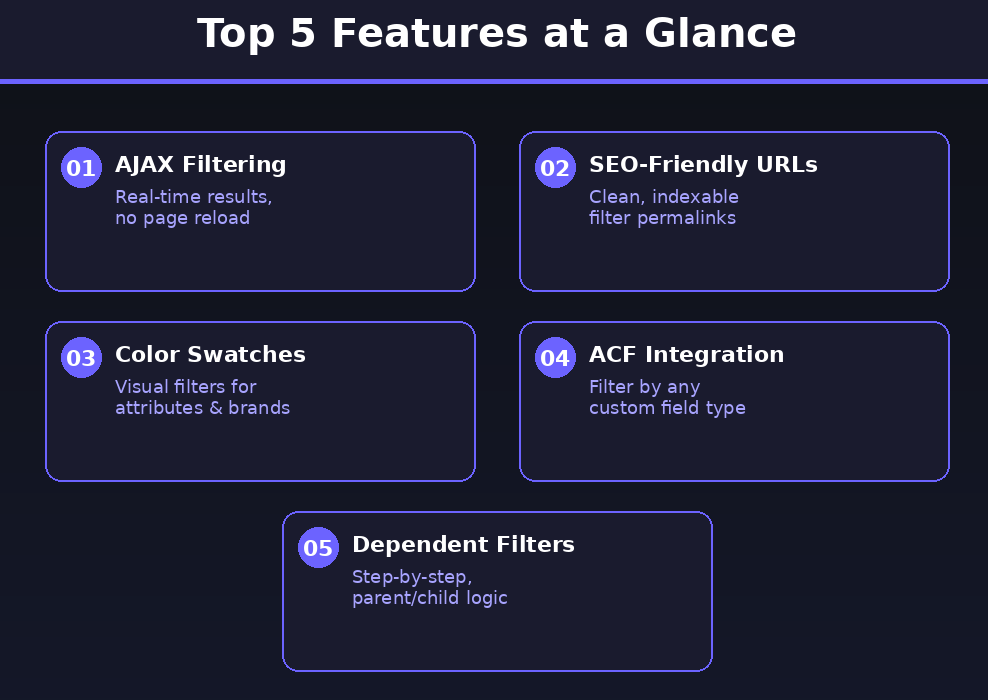
1. AJAX Filtering with No Page Reload
Filter Everything PRO updates product listings instantly as users select filter options, without reloading the page. This keeps the shopping experience fast and fluid, particularly important for stores with large catalogs where traditional page-reload filters create a frustrating lag.
2. SEO-Friendly Filter URLs
Unlike most filter plugins that generate messy URL parameters, Filter Everything PRO produces clean, human-readable URLs like /smartphones/color-blue/brand-apple/. These pages can be safely indexed by search engines, letting you capture long-tail keyword traffic from filtered category combinations without any manual effort.
3. Color Swatches and Brand Logos
Beyond standard checkboxes and dropdowns, the plugin supports visual filter elements including color swatches and brand logo grids. These make browsing feel intuitive and on-brand, particularly for fashion, electronics, and lifestyle product stores.
4. Advanced Custom Fields (ACF) Support
Filter Everything PRO integrates directly with ACF, letting you build filters from any structured data attached to your posts or products. Supported field types include checkboxes, radio buttons, select dropdowns, number fields, and true/false toggles, covering virtually any data architecture you might be working with.
5. Step-by-Step Dependent Filtering
The plugin supports parent/child filter relationships where selecting one option narrows the available choices in the next filter. This is a powerful UX feature for complex product catalogs like automotive parts, furniture configurations, or medical supplies where selections must be logically sequential.
Filter Everything Alternatives
WooCommerce’s Default Layered Nav Widget
WordPress and WooCommerce include a basic layered navigation widget out of the box. It covers simple taxonomy and attribute filtering but has no AJAX, no SEO URL support, and no price range slider. It works for very small stores with minimal filtering needs but falls short the moment your catalog grows.
YITH WooCommerce Ajax Product Filter
YITH’s filter plugin is one of the more popular alternatives. It offers solid AJAX filtering and a polished interface, but the full-featured version is subscription-based at around $79.99/year, which adds up over time. Filter Everything PRO’s one-time $49 fee makes it the better long-term value for most store owners.
WooCommerce Product Filter by XforWooCommerce
This alternative handles basic filtering with a decent free tier and a premium upgrade. It integrates well with standard WooCommerce setups but lacks the depth of SEO tooling, ACF support, and page builder compatibility that Filter Everything PRO offers. It suits simpler stores but is not built for complex multi-content-type filtering.
Why Choose the One-Time License?
Paying $49 once for Filter Everything PRO instead of subscribing to a recurring SaaS filter tool is a straightforward financial win for any store that plans to be online for more than a year.
- One-time payment, zero monthly fees going forward
- Locks in full access before any future price hikes on CodeCanyon
- For a store generating even a modest 5 to 10 extra conversions per month from better product discoverability, the $49 cost is recovered in the first week
- Ideal for freelancers, agencies managing multiple client stores, and small business owners watching their SaaS spend
The lifetime deal model, popularized by AppSumo and similar platforms, has made developers and buyers alike familiar with the idea of paying once and owning forever. Envato’s CodeCanyon works on the same principle: a one-time purchase gives you the plugin plus 6 months of author support and all future updates released within that window.
Pricing on CodeCanyon can change, and the extended license (for products where end users are charged) is $149. If you need the plugin for a client project or your own store, the $49 regular license is the one to grab now.
What is the Filter Everything Pricing?
| Field | Details |
|---|---|
| Plan: Regular License | $49 one-time |
| Plan: Extended License | $149 one-time |
| Includes | Plugin files, all future updates, 6 months author support, SEO engine, AJAX filtering, full admin dashboard |
| Deal Source | CodeCanyon (Envato Market) |
| Refund Policy | Covered under Envato’s standard refund policy. Check current terms on CodeCanyon at time of purchase. |
| Deal Status | Active on CodeCanyon |
| Free Version | Available on WordPress.org (limited features) |
Filter Everything: Our Verdict
Filter Everything PRO is the most complete, SEO-forward filter plugin available on CodeCanyon right now. With over 15,000 sales, a 4.91-star rating, compatibility with every major page builder, and a built-in SEO rules engine that most competitors charge extra for, it delivers exceptional value at $49.
It is the right choice for WooCommerce store owners with growing catalogs, developers building client sites, and agencies who want one filter plugin that handles every use case without extra add-ons.
Ready to grab it? Get Filter Everything PRO on CodeCanyon for $49
Summary
Filter Everything PRO is a premium WordPress and WooCommerce filter plugin available on CodeCanyon for a one-time $49 regular license. It supports AJAX filtering, clean SEO URLs, color swatches, ACF integration, and compatibility with all major page builders. It is built for store owners, developers, and agencies who need flexible, scalable product filtering without a recurring subscription. With 15,000+ sales and near-perfect reviews, it is one of the most trusted filter solutions in the WordPress ecosystem today. If your store needs better product discoverability, this is the plugin to get.
Frequently Asked Questions (FAQ)
Q: Is Filter Everything PRO worth it in 2026? Yes. At $49 for a one-time regular license, it is among the best-value WooCommerce filter plugins available. The combination of AJAX performance, SEO URL generation, and broad page builder compatibility makes it a complete solution that justifies the cost for any store with more than a handful of products.
Q: Does Filter Everything have a free trial or free plan? There is a free version available on WordPress.org. It covers basic filtering functionality but does not include the SEO rules engine, advanced UI options like color swatches, or ACF field support. Those features require the PRO version from CodeCanyon.
Q: Who is Filter Everything PRO best suited for? It is best suited for WooCommerce store owners with medium to large product catalogs, developers and agencies building eCommerce sites for clients, and anyone running a content-heavy WordPress site (listings, directories, portfolios) that needs flexible front-end filtering.
Q: Can I use Filter Everything PRO with Elementor? Yes. The plugin is explicitly tested and compatible with Elementor and Elementor Pro, as well as Divi, WPBakery, Beaver Builder, Oxygen Builder, and the native WordPress Block Editor with Query Loop blocks.
Q: What support comes with the purchase? Your $49 purchase includes 6 months of support from the author, Stepasyuk, who is listed as an Elite Author on Envato. Support can be extended to 12 months for an additional fee at checkout. The developer is known for fast, non-bot responses during business hours.
Q: Is Filter Everything PRO compatible with multilingual and multi-currency setups? Yes. The plugin ships with a .pot translation file and is already translated into Ukrainian, Czech, German, French, Italian, Dutch, Polish, and Spanish. It has been tested with WPML, Polylang, WOOCS, and CURCY, making it a solid choice for international stores.
Published by GrabbedDeals.online – Appsumo Deals | WP Themes & Plugins | DealFuel | Dealify | DealMirror | RocketHub | StackSocials | Others|





2 comments
I’ve noticed that intuitive product filters do more than just improve user experience—they also provide valuable insights into which categories or products are most engaging. It’s a subtle way to combine better navigation with actionable analytics for eCommerce stores.
Focusing on AJAX query parameters for filtering is a smart move, as it drastically improves user experience without needing a page reload. The emphasis on avoiding recurring SaaS fees through a one-time license is especially relevant for store owners looking to optimize long-term costs in 2026.