My wrist started hurting sometime last year. Not dramatically. Just that dull, nagging ache you get after hours of typing client emails, Slack threads, Notion docs, Google Sheets comments. All of it. And I kept thinking: there has to be a smarter way to do this.
I tried a few dictation tools along the way. Most of them were clunky. You had to switch apps, paste your text somewhere else, clean up the weird formatting yourself. Not worth the hassle. So I went back to typing.
Then I came across Amical on AppSumo, and honestly, this dictation tool hits differently. Get Lifetime Deals
What Is Amical?
Amical is a fast, privacy-first AI dictation software built to work inside any app you already use, on Mac, Windows, iOS, and Android. You press a hotkey, speak, and your words show up as clean, properly formatted text, right where your cursor is.
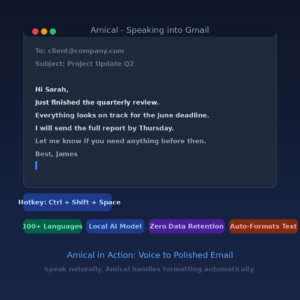
What makes it stand out from older transcription tools is the context-awareness. If you are dictating in Gmail, it formats your speech like a professional email. If you are in WhatsApp, it sounds casual. If you are in Slack, it trims the fluff. The same sentence gets shaped differently depending on the app you are in. That is genuinely useful.
Amical is built by a small bootstrapped startup out of Vancouver, and they run their own AI models rather than wrapping someone else’s API. That means faster response times and better privacy control. They have logged over a billion words transcribed since launch, which tells you people are actually sticking with it.
It is built for:
- Content creators writing faster without touching the keyboard
- Remote teams dictating updates across Slack, Gmail, and Jira
- Solopreneurs who want to cut typing time and protect sensitive business conversations
How Does Amical Work?
Getting started is pretty quick. Here is how the flow works once you are set up:
- Download and install Amical on your device. It is available for Mac, Windows, iPhone, and Android. The installer is lightweight and setup takes a few minutes.
- Set your hotkey. The default is a simple keyboard shortcut. You can customize this to whatever feels natural for your workflow.
- Open any app you want to type in. Gmail, Notion, Slack, Jira, Discord, a browser text field. Anywhere your cursor can go.
- Press the hotkey and speak. Amical picks up your voice and transcribes in near-real-time. You can use local AI (fully offline, runs on your device) or switch to cloud models for faster processing.
- Watch your text appear, formatted for context. No pasting, no cleanup, no app-switching. It lands right where you were typing.
You can also set up custom voice commands and shortcuts to trigger frequent actions hands-free, which is something I got into after about a week of use.
Tips for Getting the Most Out of Amical
Tip 1: Set up your custom vocabulary first. If you work in a specific niche, whether that is SaaS, legal, medical, or finance, add your jargon and proper nouns before you start. Amical learns your terminology over time, but seeding it manually upfront saves you a lot of cleanup. This is one of the most underrated features for professional users.
Tip 2: Use local models for sensitive work. When you are dictating client calls, financial notes, or anything confidential, switch to the local Whisper model. Your audio never leaves your device. This matters more than most people realize for on-device speech transcription with real privacy guarantees. Amical’s documentation covers this in detail on their official setup guide.
Tip 3: Customize your writing style per app. Amical lets you define different writing styles for different contexts. Set up a “formal” style for client emails and a “casual” style for internal Slack messages. It takes ten minutes to configure and saves you from sounding weirdly corporate in a DM.
Tip 4: Pair it with your note-taking workflow. I use Amical alongside Notion for voice-powered productivity during brainstorming sessions. Instead of typing out raw ideas, I just talk through them. It converts the stream of consciousness into usable notes surprisingly well, especially once you train it on your vocabulary.
Tip 5: Do not skip the mixed-language sessions if you work multilingually. One mistake I made early on was assuming it would choke on switching between English and another language mid-sentence. It handles mixed-language dictation in a single session without needing manual switching. If you work across language contexts, test this out. It is genuinely solid.
Amical Review: Pros and Cons
Amical is one of the better-built tools I have used this year, but no tool is perfect. Here is the honest breakdown:
Pros
- Hotkey activation works instantly across thousands of apps, no context-switching required
- Local AI option means complete privacy with zero data retention
- Auto-formatting adapts to the app you are using, which is actually impressive in practice
- 100+ language support with mixed-language session capability
Cons
- Cloud model speed is noticeably better than local on older machines; local can feel slightly slower on lower-spec hardware
- Custom vocabulary setup requires some manual effort upfront to get the best results
- Newer product (founded mid-2025) so edge cases and language-specific quirks are still being ironed out
Top 5 Features of Amical
1. Context-Aware Auto-Formatting This is the headline feature. Amical does not just dump raw transcript into whatever app you are using. It reads the context, Gmail vs. WhatsApp vs. Jira, and shapes your dictated text to match. The result is text that looks like you typed it carefully, not like a voice memo someone forgot to clean up. This addresses the core pain point of most real-time voice transcription tools.
2. Local AI with Zero Data Retention You can run Amical entirely offline using on-device Whisper models. Nothing leaves your machine. For professionals handling sensitive information, this is not a nice-to-have; it is a requirement. Even when you switch to cloud models for speed, Amical’s policy is zero audio retention. No training on your transcriptions, either.
3. Custom Vocabulary and Voice Commands Amical lets you add your own terms, brand names, acronyms, and shortcuts. Beyond that, you can set up custom voice commands to trigger frequent actions. Once configured, this turns Amical into more of a voice-controlled assistant than a simple transcription tool. Think of it as a speech recognition shortcut system built on top of dictation.
4. Cross-Platform with Unlimited Devices One purchase covers Mac, Windows, iPhone, and Android, with unlimited devices under a single license. Switching between your MacBook and your phone mid-day does not break your workflow. The experience stays consistent across platforms, which is rarer than it should be.
5. Open-Source Foundation Amical is fully open-source. That means if the company ever changes direction, you still have access to the codebase. It is a meaningful commitment to long-term availability that most SaaS tools cannot offer.
Amical in Action
This official walkthrough from the Amical team is worth a watch before you buy. It shows the hotkey activation, the auto-formatting across different apps, and the local vs. cloud model selection in real use. Short, no fluff.
Amical Alternatives
If you are comparing options before deciding, here are three tools that come up in the same voice-to-text productivity conversation:
WisprFlow
WisprFlow is probably the most direct competitor. It also offers AI dictation with formatting intelligence across apps. It tends to be stronger on Mac specifically, but the pricing model is subscription-based, which makes Amical’s lifetime deal significantly more attractive over a 2-3 year horizon. WisprFlow does not currently offer a local offline model.
Otter.ai
Otter is well-known for meeting transcription and real-time collaboration on call recordings. Where it falls short for this use case is in-app dictation. It is designed around meeting notes and summaries rather than typing inside Gmail or Slack. A solid meeting transcription software tool, but a different job entirely.
Grammarly Voice
Grammarly added voice input features to its keyboard app on mobile. It works reasonably well within its own ecosystem, but it does not give you the cross-app hotkey control or local AI option that Amical offers. It is a writing assistant first; dictation is a secondary feature.
Our Verdict on the Amical Lifetime Deal
If you are looking for the best AI dictation app for solopreneurs and remote teams in 2026, the Amical lifetime deal is one of the sharper buys on AppSumo right now. It is not just a transcription recorder. It is a dictation layer that sits on top of every app you already use, formats your speech intelligently, and keeps your data private by default.
The local AI option alone sets it apart from most competitors. Add in the open-source codebase, the custom vocabulary, and the cross-platform consistency, and it is hard to find a reason not to grab this at the current price.
Ready to grab the deal? Get the Amical Lifetime Deal on AppSumo
Frequently Asked Questions
Q: Is Amical worth it in 2026? For daily computer users who type a lot, yes. The context-aware formatting alone saves significant cleanup time, and the local AI option makes it one of the few dictation tools you can use on genuinely sensitive work. At $49 lifetime, the ROI is quick.
Q: Does Amical have a free trial or free plan? The AppSumo deal includes a 60-day money-back guarantee, which effectively gives you two months to test it in your real workflow. There is no indefinite free tier listed outside the deal window.
Q: Who is Amical best suited for? Content creators, solopreneurs, remote workers, and small teams who spend hours each day typing across multiple apps. It is especially strong for people who work across languages or handle sensitive information that should not leave their device.
Q: How long is the Amical lifetime deal available? AppSumo lifetime deals run for a limited window. Once the campaign closes, pricing moves back to a standard subscription model. There is no firm end date listed, but these deals tend to close once the target volume is hit.
Q: Can I get a refund on the Amical lifetime deal? Yes. AppSumo offers a 60-day money-back guarantee on all lifetime deals. No hoops, no complicated process.
Q: Can Amical handle technical jargon and industry-specific terms accurately? Yes, through the custom vocabulary feature. You can add your own terms, abbreviations, and proper nouns before you start. Once trained, accuracy on specialist language is noticeably better than out-of-the-box transcription tools.
Published by GrabbedDeals.online – Appsumo Deals | WP Themes & Plugins | DealFuel | Dealify | DealMirror | RocketHub | StackSocials | Others|