I have a friend who runs a small fitness brand. He posts workout videos on YouTube, but lately he’s been frustrated. YouTube controls the experience, pushes competitor ads on his videos, and the whole thing feels like he’s building on rented land. He kept saying, “I just want my own channel, like a real TV channel, on my own website.”
That conversation stuck with me, because it’s a real problem a lot of creators and small brands face. Then I came across Viloud on AppSumo, and the whole thing clicked. Get Lifetime Deals
What Is Viloud?
Viloud is a cloud-based platform that lets you create your own branded online TV channel, without writing a single line of code. It is built for content creators, marketers, educators, videographers, and anyone who wants to publish video in a real broadcast format rather than just uploading clips to a third-party platform.
What separates Viloud from just hosting videos on Vimeo or YouTube is the format. You can create three distinct channel types: a linear channel (everyone watches the same content simultaneously, like a real TV station), an on-demand channel (viewers control playback), and a FAST channel (compatible with platforms like Pluto TV, Roku, and Tubi).
According to verified user reviews on Capterra, Viloud consistently earns high marks for ease of use and the quality of its scheduling tools. Users particularly appreciate how quickly they can get a fully branded channel up and running.
Key attributes at a glance:
- No coding required to launch a channel
- Supports cloud-hosted video and external CDN links (HLS/M3U8)
- Embeddable branded player for any website
How Does Viloud Work?
Getting started with Viloud is genuinely straightforward. Here is the basic workflow most new users follow:
- Sign up and create a channel. You pick the channel type (linear, on-demand, or FAST) and give it a name and branding. The dashboard is clean and not overwhelming.
- Upload your videos or add links. You can upload MP4, MOV, and WebM files directly, or paste HLS (.m3u8) links from your own CDN. If you use an external host, no storage minutes are counted against your plan, which is a big deal.
- Schedule your content. For linear channels, you drag and drop videos onto a scheduling grid to build out your programming. Think of it like building a TV guide for your own station.
- Customize your player. Viloud gives you a branded video player you can embed on your site with your own colors and logo. There is also a white-label option that removes all Viloud branding entirely.
- Distribute and monetize. You get an embeddable player for your website, an M3U8 link for third-party OTT platforms (Roku, Apple TV, etc.), and ad monetization via VAST, VPAID, and VMAP tags.
Tips for Using Viloud
A few things I picked up that will save you time and headaches:
- Use your own CDN for large libraries. If you have a lot of existing video content hosted elsewhere, add it via HLS links rather than re-uploading. You bypass all storage and streaming minute limits this way. It is one of those features buried in the FAQ that most people miss.
- Build your weekly schedule in one sitting. The scheduling grid works best when you block out an hour and plan a full week of programming at once. Trying to add content one video at a time gets tedious fast.
- Test your ad tags before going live. Viloud has a built-in VAST/VPAID Inspector tool. Use it before you embed your player anywhere. A broken ad tag silently kills your monetization and you will not notice for days. According to Viloud’s official help documentation, the Ad Tester is one of the most underused features in the platform.
- Combine a linear channel with a live stream. You can set up Viloud to automatically switch a channel into live mode when you go live via RTMP, then switch back to scheduled content when the stream ends. It keeps your channel active 24/7 without any manual intervention.
- Do not overlook the CNAME setup. The custom domain feature (CNAME) lets you serve your channel from your own branded domain. A lot of users skip this step and then wish they had set it up from the start. It takes maybe 20 minutes in your DNS settings.
Viloud Review: Pros and Cons
Viloud does a genuinely good job of making professional broadcast-style video publishing accessible to small teams and solo creators. That said, like any tool, it has limitations worth knowing before you buy.
Pros
- No technical knowledge needed to launch a fully functional TV channel
- External CDN / HLS link support effectively removes storage and bandwidth limits
- Live streaming, recording, and automated scheduling all in one place
- Ad monetization (VAST, VPAID, VMAP) built right in, no third-party workaround
- M3U8 output opens the door to Roku, Apple TV, and other OTT platforms
Cons
- Storage minutes on lower-tier plans fill up quickly if you upload directly (external CDN solves this but requires more setup)
- Website builder customization is limited compared to dedicated website tools
- DNS/CNAME configuration can confuse first-timers without a clear walk-through
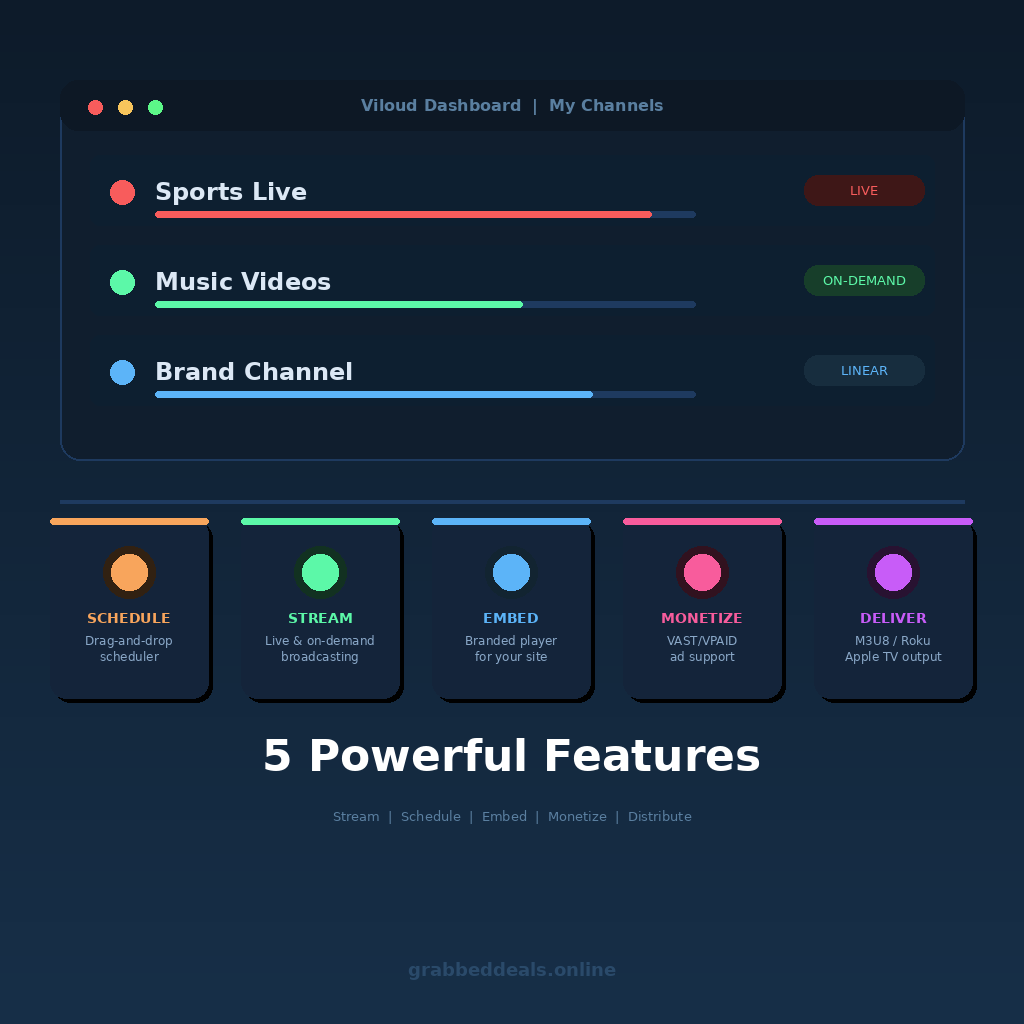
Top 5 Features of Viloud
1. Linear TV Channel Scheduling
The drag-and-drop content scheduler is the centerpiece of Viloud. You build a programming grid and your entire audience watches the same content at the same time, just like a real broadcast. It loops automatically, so your channel never goes dark. For brands that want a “tune in” feel rather than a random playlist, this is incredibly powerful.
2. Live Streaming with Auto-Switch
You can go live on any channel using an RTMP encoder, and Viloud automatically switches the channel into live mode the moment your stream starts. When the session ends, it flips back to scheduled content. You can also keep the recording for on-demand playback afterward. No manual intervention required.
3. Embeddable Branded Player
Viloud gives you a fully customizable video player you can drop onto any website. It supports your own brand colors, custom logo overlays, and even a white-label mode that strips out all Viloud branding. This is a big deal for agencies building experiences for clients.
4. M3U8 Output for OTT Distribution
Every linear channel generates an M3U8 link that you can plug into Roku, Apple TV, mobile apps, or any third-party player that supports HLS streams. This effectively turns Viloud into a distribution engine, not just a player. Getting your content onto a Smart TV without expensive middleware is a genuine competitive advantage.
5. Built-in Ad Monetization
Viloud supports all major video ad standards out of the box: VAST, VPAID, and VMAP. You paste in an ad tag URL from Google AdSense, FreeWheel, SpotX, or any other provider, and Viloud handles the rest. For creators looking to offset the cost of running a channel, this is a direct revenue path built right into the platform.
Viloud
The official Viloud demo on YouTube is worth watching before you dive in. It shows the full dashboard flow, from creating a channel to embedding the player, in under 10 minutes and saves you a lot of trial-and-error on your first session.
Viloud Alternatives
Wowza Streaming Engine
Wowza is a robust, enterprise-grade live streaming platform that has been around for years. It offers deep customization and scalability, but it is complex to set up and significantly more expensive. Better suited for large media companies than individual creators or small brands.
Dacast
Dacast is a solid all-in-one video hosting and live streaming platform with good monetization options. It supports pay-per-view and subscription models, which Viloud does not currently offer. However, Dacast has no linear TV scheduling or FAST channel support, so the broadcast-style experience Viloud offers is not there.
Cloudflare Stream
Cloudflare Stream is great for developers who want reliable, globally distributed video delivery at low cost. It does not have a scheduler, branded player customization, or ad monetization built in, so it requires much more custom development to replicate what Viloud does out of the box.
Viloud Lifetime Deal: Our Verdict
Viloud is the right tool if you are tired of publishing on platforms you do not control and you want a real branded broadcast experience without a broadcast budget. The scheduling, live streaming, embeddable player, OTT distribution, and ad monetization are all genuinely useful, not just checkbox features.
The storage limits at the 1-code tier are real, but the external CDN workaround is solid. If you already have video content hosted somewhere, you can start at $99 and effectively have unlimited scale.
For creators, educators, brand marketers, and small media teams, this lifetime deal is a straightforward yes.
Ready to grab the deal? Get Viloud on AppSumo for $99
Frequently Asked Questions (FAQ)
Q: Is Viloud worth it in 2026? For anyone serious about video content distribution, yes. The combination of linear TV scheduling, live streaming, branded player, and ad monetization in a single platform at a one-time price is hard to match. The team has actively updated the product since launching, and the AppSumo return in 2026 came with meaningful improvements including FAST channel support and better M3U8 output.
Q: Does Viloud have a free trial or free plan? Viloud does not currently advertise a permanent free plan, but the AppSumo deal comes with a 60-day money-back guarantee, which gives you a risk-free window to test the platform thoroughly before committing.
Q: Who is Viloud best suited for? Viloud works best for content creators, videographers, online educators, brand marketing teams, and small broadcasters who want a professional broadcast setup without enterprise-level complexity or budget. It is particularly strong for anyone who wants to distribute to OTT platforms like Roku or Apple TV.
Q: How long is the Viloud lifetime deal available? AppSumo lifetime deal campaigns run for a limited window and close without much warning. If the deal is live when you are reading this, it is worth acting sooner rather than later.
Q: Can I get a refund on the Viloud lifetime deal? Yes. AppSumo offers a 60-day money-back guarantee on all lifetime deals, including Viloud. You have two full months to test the product and request a refund if it does not work for you.
Q: What happens to my channels if Viloud shuts down someday? This is a fair question for any lifetime deal purchase. Viloud is a bootstrapped company founded in 2015 with over a decade of operation and an established customer base. For added peace of mind, using your own external CDN with HLS links means your actual video assets live outside of Viloud’s infrastructure. The channel logic and player are Viloud-dependent, but your content stays yours.
Published by GrabbedDeals.online – Appsumo Deals | WP Themes & Plugins | DealFuel | Dealify | DealMirror | RocketHub | StackSocials | Others|