Getting a client to sign a contract should take minutes, not days of back-and-forth emails. BreezeDoc is a lightweight electronic signature tool built specifically for freelancers, consultants, and solopreneurs who need to close deals quickly and professionally. Right now, you can lock in lifetime access on AppSumo for a one-time payment, which makes this one of the most compelling e-signature deals of 2026. Get Lifetime Deals
What is BreezeDoc?
BreezeDoc is an electronic signature platform developed by AppSumo Originals, built for independent professionals and small teams who need a simpler, more affordable alternative to tools like DocuSign, Adobe Sign, and HelloSign. It falls squarely in the contract management and e-signature software category, and it was designed with one goal in mind: get documents signed fast without the complexity or the monthly bill.
The tool is best suited for consultants, freelancers, and solopreneurs who regularly send proposals, service agreements, NDAs, or client onboarding documents. It has been consistently well-reviewed by verified users on G2 in the e-signature category, where ease of use and affordability are the top decision factors for independent users.
Key product attributes include:
- Legally binding e-signatures with a full audit trail
- Pre-made, ready-to-send document templates included
- Automatic email notifications and reminders to signers
How Does BreezeDoc Work?
BreezeDoc keeps the signing workflow as simple as possible. Here is how a typical user gets started:
- Upload or select a template. Upload your own contract as a PDF or choose from BreezeDoc’s library of pre-made, verified templates for common agreements.
- Add signature fields. Drag and drop signature boxes, initial fields, text fields, and date fields wherever you need them in the document.
- Enter recipient details. Add one or multiple signers by email address. You can customize the outgoing email notification to match your brand tone.
- Send and track. Hit send and monitor your document in real time through the activity log. You can see when each recipient opens, views, or signs the document.
- Auto-distribute the final copy. Once all parties have signed, BreezeDoc automatically sends the completed document to everyone involved, no manual downloading and forwarding required.
Tips for Using BreezeDoc
Getting the most out of BreezeDoc comes down to a few smart habits from day one.
- Use templates from the start. BreezeDoc includes pre-built templates for common contract types. Setting these up early saves time on every future document.
- Enable automatic reminders. Turn on email reminders for recipients who have not signed yet. This alone can cut your average contract turnaround time significantly.
- Check the activity log regularly. The audit trail shows exactly when each recipient opened and acted on a document. Use this to spot delays and follow up at the right moment rather than sending generic nudges.
- Connect to Zapier for automation. BreezeDoc supports Zapier and API access on both plans, so you can automate follow-ups, update a CRM, or trigger invoices the moment a contract is signed. As verified user data on Capterra shows, integrations like this are what separate basic e-signature tools from genuinely productive ones.
- Avoid uploading editable Word docs. BreezeDoc works best with PDFs. Convert your contracts to PDF before uploading to ensure field placement stays accurate across devices.
BreezeDoc Review: Pros and Cons
BreezeDoc delivers a lot of value for its price point, but like any focused tool, it has trade-offs worth knowing before you buy.
Pros
- Extremely simple interface with a flat learning curve
- Lifetime access at a fraction of DocuSign or Adobe Sign pricing
- Legally binding signatures backed by a full audit trail
- Zapier and API access available on both plans
- Stripe-connected invoice sending now built in
Cons
- Individual plan capped at 20 documents per month
- Not built for advanced compliance like HIPAA or eIDAS
- Branding removal only available on the Agency plan
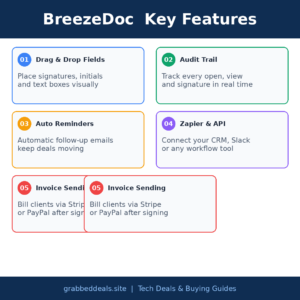
Top 5 Features of BreezeDoc
1. Drag-and-Drop Signature Fields
BreezeDoc makes field placement completely visual. You drag signature boxes, initials, text inputs, and date fields directly onto your document without any coding or configuration. This matters because it means you can customize any uploaded contract in under two minutes, even if you have never used an e-signature tool before.
2. Real-Time Document Tracking and Audit Trail
Every document sent through BreezeDoc generates a time-stamped activity log showing when the recipient received, opened, and signed. This audit trail is critical for legal validity and for resolving disputes quickly. Knowing exactly where a document stands at any moment removes the most stressful part of chasing signatures.
3. Automatic Email Reminders and Notifications
BreezeDoc handles follow-ups so you do not have to. Automatic reminder emails go out to anyone who has not signed by a set date, and once the document is fully executed, the platform distributes the final copy to all parties automatically. This keeps deals moving without requiring you to babysit every contract.
4. Zapier and API Integration
Both the Individual and Agency plans include full Zapier and API access. This opens up a wide range of automation possibilities: logging signed contracts in a spreadsheet, triggering payment requests, updating a project management tool, or notifying your team in Slack. For anyone running systems-driven workflows, this is a significant advantage over bare-bones e-signature tools.
5. Invoice Sending with Stripe and PayPal
A newer addition to BreezeDoc allows users to send invoices directly alongside or separately from documents. You can connect a Stripe or PayPal account and issue payment requests right after a contract is signed. For freelancers who bill clients immediately upon agreement, this closes the loop between contract execution and getting paid.
BreezeDoc Alternatives
DocuSign
DocuSign is the market leader in e-signatures and offers deep enterprise features, advanced compliance options including HIPAA and eIDAS, and integrations with virtually every major business platform. However, pricing starts at $15 per month and climbs steeply for team plans, making it far more expensive over time than a BreezeDoc lifetime deal for the same solo or small-team use case.
Adobe Sign (Acrobat Sign)
Adobe Sign is a strong option if you are already inside the Adobe ecosystem and need tight integration with Acrobat for document editing. It supports more complex workflows and international compliance standards. The downside is that it requires an Adobe subscription, which adds cost and complexity that most freelancers simply do not need.
HelloSign (Dropbox Sign)
Dropbox Sign offers a clean interface and solid document management, especially if you store files in Dropbox. It has a free tier limited to three documents per month, making it viable for very light users but quickly requiring an upgrade. For anyone sending more than a handful of contracts, the recurring subscription cost makes BreezeDoc’s one-time deal a far more economical long-term choice.
Why Choose the Lifetime Deal?
Subscription pricing for e-signature tools adds up fast. DocuSign’s entry plan runs around $180 per year. Adobe Sign is bundled into subscriptions that cost even more. With BreezeDoc’s lifetime deal, you pay once and never see another invoice for the software itself.
Locking in early also protects you from price increases. Once the AppSumo campaign closes, BreezeDoc will revert to standard subscription pricing, and early buyers keep their access at the original rate. The long-term return on a $19 investment is difficult to argue against for any freelancer or consultant who sends even a few contracts per month.
The lifetime deal model, popularized by platforms like AppSumo, has made premium software accessible to independent professionals who previously could not justify ongoing software costs. BreezeDoc is a direct product of that model, built specifically for solopreneurs and small teams who need professional tools without enterprise pricing.
- One-time payment, zero monthly fees going forward
- Full access locked in before any future price increases
- Ideal ROI for freelancers, consultants, and small business owners who bill via contracts
- 60-day money-back guarantee removes all purchase risk
Note: Lifetime deals on tools like BreezeDoc tend to run for a limited window. Once the campaign closes, pricing typically reverts to a monthly or annual subscription.
What is the BreezeDoc Lifetime Deal?
| Field | Details |
|---|---|
| Individual Plan | $19 (one-time) |
| Includes | 20 documents/month, unlimited templates, 1 user, email reminders, API and Zapier access, document passcodes, redirect after signing, custom logo, invoice sending |
| Agency Plan | $49 (one-time) |
| Includes | Unlimited documents/month, up to 10 team members, no BreezeDoc branding, all Individual Plan features |
| Deal Source | AppSumo (AppSumo Originals) |
| Refund Policy | 60-day money-back guarantee |
| Deal Status | Active, check current availability |
BreezeDoc Lifetime Deal: Our Verdict
BreezeDoc hits the sweet spot for freelancers, consultants, and solopreneurs who send contracts regularly and do not want to pay $15 to $30 per month indefinitely for a tool they need a handful of times each week. The interface is genuinely simple, the audit trail is solid for U.S.-based legal validity, and the newly added invoice sending makes it a more complete tool than it was at launch. The 20-document monthly cap on the Individual plan is the only real limitation to be aware of. If you regularly send more than that, the $49 Agency plan is the obvious pick.
Ready to grab the deal? Get BreezeDoc on AppSumo for $19
Summary
BreezeDoc is a fast, simple electronic signature tool built by AppSumo Originals for freelancers, consultants, and solopreneurs who need to send contracts and collect legally binding signatures without the complexity or cost of tools like DocuSign or Adobe Sign. The AppSumo lifetime deal starts at just $19, covers unlimited templates, full API access, and automatic email reminders. With a 60-day money-back guarantee and a transparent audit trail for every document, this is one of the strongest value plays in the e-signature category for independent professionals in 2026.
Frequently Asked Questions (FAQ)
Q: Is BreezeDoc worth it in 2026?
Yes, for freelancers and consultants who send contracts regularly, the $19 lifetime deal is exceptional value compared to any monthly subscription alternative. The tool covers the core e-signature workflow cleanly, with extras like invoice sending and Zapier automation making it genuinely useful beyond basic signing.
Q: Does BreezeDoc have a free trial or free plan?
BreezeDoc does not currently offer a free plan. However, the AppSumo deal includes a 60-day money-back guarantee, which effectively functions as a risk-free trial period for new buyers.
Q: Who is BreezeDoc best suited for?
BreezeDoc is built for consultants, freelancers, and solopreneurs in the U.S. who send client agreements, NDAs, or service contracts and need a straightforward, affordable way to collect signatures. It is not designed for large enterprises or businesses requiring HIPAA or eIDAS compliance.
Q: How long is the BreezeDoc lifetime deal available?
AppSumo Originals deals typically run for a limited window before reverting to standard subscription pricing. The current lifetime deal is active, but availability can change at any time.
Q: Can I get a refund on the BreezeDoc lifetime deal?
Yes. AppSumo offers a 60-day money-back guarantee on all purchases, including BreezeDoc. If it does not fit your workflow, you can request a full refund within that window.
Q: Does the recipient need a BreezeDoc account to sign a document?
No. Recipients can open and sign documents directly from the email link BreezeDoc sends them. They do not need to create an account, which significantly reduces friction and speeds up the signing process for clients.
Published by GrabbedDeals.online – Appsumo Deals | WP Themes & Plugins | DealFuel | Dealify | DealMirror | RocketHub | StackSocials | Others|