Paying for Microsoft 365 every single month gets old fast, especially when your needs haven’t changed. Microsoft Office 2024 Home & Business gives you Word, Excel, PowerPoint, Outlook, and OneNote through a single one-time payment on StackSocial, and the deal currently sits at a record-low price. Get Lifetime Deals
What Is Microsoft Office 2024 Home & Business?
Microsoft Office 2024 Home & Business is the latest perpetual release of Microsoft’s flagship productivity suite, designed for home users, freelancers, and small business owners who want reliable tools without a recurring subscription. It covers the full core lineup: Word, Excel, PowerPoint, Outlook, and OneNote, all installed directly on one PC or Mac.
Unlike Microsoft 365, this is a one-time purchase that does not require an internet connection to function after activation. It is tied to your Microsoft account rather than a specific device, which means you can reinstall it if you switch machines. The suite targets professionals and households who prioritize ownership and cost predictability over cloud-driven feature updates. It has been consistently well-reviewed by verified users on G2 across the office suites category.
Key attributes at a glance:
- One perpetual license covering Word, Excel, PowerPoint, Outlook, and OneNote
- Compatible with both Windows 10/11 and macOS
- License tied to a Microsoft account, not a single physical device
How Does Microsoft Office 2024 Home & Business Work?
Getting set up is straightforward from purchase to first use:
- Purchase on StackSocial. Complete the checkout and a license key plus installation instructions arrive in your email immediately after purchase.
- Redeem within seven days. The code must be redeemed within seven days of purchase, so do not let it sit in your inbox.
- Sign in to your Microsoft account. Activation links the license to your Microsoft account rather than the device itself.
- Download and install. Download the Office 2024 installer from your Microsoft account profile page and run it on your PC or Mac.
- Launch and start working. All five apps are available offline from the moment installation completes, no ongoing internet connection required.
Tips for Using Microsoft Office 2024 Home & Business
Getting the most from Office 2024 comes down to knowing what is new and where people tend to trip up:
- Use Focus Mode in Word for distraction-free drafting. Word 2024 includes a Focus Mode that hides the ribbon and toolbars entirely, letting you write without the visual noise that breaks concentration during longer documents.
- Lean on dynamic arrays in Excel for live data outputs. Functions like FILTER, SORT, and UNIQUE now output ranges that update automatically as source data changes, cutting out the manual formula-refreshing most users waste time on.
- Record directly in PowerPoint instead of using a separate tool. The built-in recorder captures voice narration, live camera video, and auto-generates closed captions, eliminating the need for third-party screen-recording software for presentation videos.
- Pair it with free Microsoft 365 online for cloud collaboration. When you need to co-edit with someone who uses 365, uploading your file to the free web version of Office bridges the gap without requiring an upgrade.
- Do not confuse this with Microsoft 365. As verified reviews on Capterra confirm, the best productivity suites in this category are transparent about feature differences. Office 2024 does not include 1 TB of OneDrive storage or the AI-powered Copilot features found in a Microsoft 365 subscription. Know what you are buying.
Microsoft Office 2024 Review: Pros and Cons
A balanced assessment matters here. Office 2024 is genuinely excellent for specific users and a poor fit for others.
Pros
- One-time payment with no recurring fees, ever
- Full offline functionality on both Windows and macOS
- License tied to Microsoft account, so it survives a device upgrade
- Meaningful performance improvements in Excel and PowerPoint over Office 2021
Cons
- No upgrade path to future Office versions without a new purchase
- Does not include Copilot AI features or the 1 TB OneDrive storage in Microsoft 365
- Redemption code expires seven days after purchase
Top 5 Features of Microsoft Office 2024 Home & Business
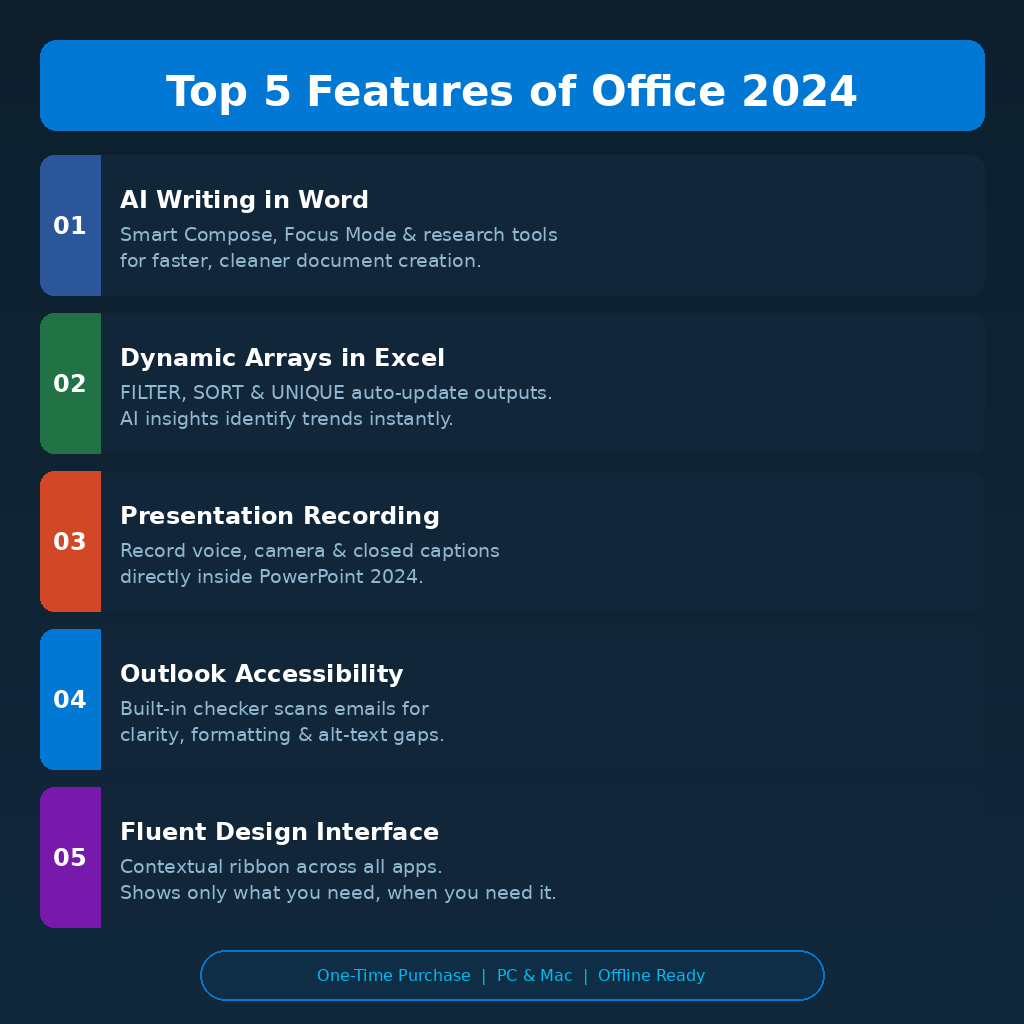
1. AI-Assisted Writing in Word
Word 2024 uses AI to power Smart Compose suggestions, intelligent formatting recommendations, and an improved research tool. These features speed up drafting and help users produce cleaner documents without toggling between a browser and the app.
2. Dynamic Arrays and AI Insights in Excel
Excel now handles data through dynamic array formulas that auto-update as inputs change. The AI-powered data analysis layer identifies trends and recommends chart types automatically, saving the time it usually takes to manually explore large datasets.
3. Full Presentation Recording in PowerPoint
PowerPoint 2024 lets users record video presentations entirely within the app, combining voice narration, live camera feed, and auto-generated closed captions. This makes it a legitimate tool for educators, remote teams, and content creators without requiring external video software.
4. Improved Accessibility Checker in Outlook
Outlook’s updated accessibility checker scans outgoing emails for unclear language, poor formatting, and missing alt text before you send. This is particularly valuable for business users who communicate with diverse audiences and need to maintain accessibility standards.
5. Fluent Design Interface Across All Apps
Every app in the suite has been updated to follow Microsoft’s Fluent Design principles. The contextual ribbon shows only the tools relevant to the current task, reducing interface clutter and shortening the learning curve for users who are new to the suite.
Microsoft Office 2024 Alternatives
Google Workspace (formerly G Suite)
Google Workspace offers Docs, Sheets, and Slides through a browser with strong real-time collaboration built in. It suits teams who work almost entirely online, but it lacks the offline depth and Excel compatibility that Office 2024 delivers for power spreadsheet users.
LibreOffice
LibreOffice is a free, open-source alternative that handles most Word and Excel file formats. It works well for budget-conscious users with basic needs, though its interface feels dated and compatibility with complex Office files remains inconsistent.
WPS Office
WPS Office offers a familiar Office-style interface at a lower price point and includes a capable PDF editor. It is a reasonable option for light users, but lacks the ecosystem depth, security track record, and Outlook integration that Office 2024 provides.
Why Choose the Lifetime Deal?
Subscription fatigue is real. Microsoft 365 Personal costs roughly $100 per year, meaning Office 2024 at its current StackSocial price pays for itself in roughly one year and then costs nothing going forward. For freelancers, home users, and small businesses that do not need the latest Copilot AI features, the math is straightforward.
Locking in a perpetual license also protects you from future price increases. Microsoft has raised Microsoft 365 pricing before, and there is no reason to assume that trend stops. The lifetime deal model, popularized by platforms like AppSumo and StackSocial, gives users a way to step off the subscription treadmill entirely.
- One-time payment, zero monthly fees going forward
- Locks in full access before any future price hikes
- Saves approximately $100 per year compared to Microsoft 365 Personal
- Ideal for freelancers, home office users, and small business teams
Lifetime deals like this one on StackSocial run for a limited window. Once the campaign closes, pricing typically reverts to full retail.
What Is the Microsoft Office 2024 Home & Business Lifetime Deal?
| Field | Details |
|---|---|
| Plan | Microsoft Office 2024 Home & Business: Lifetime License |
| Price | $89.97 (down from $249.99, a 64% discount) |
| Includes | Word, Excel, PowerPoint, Outlook, OneNote (1 PC or Mac) |
| Deal Source | StackSocial |
| Refund Policy | Unredeemed licenses: store credit within 30 days. Once redeemed, all sales are final. |
| Deal Status | Active. Check current availability on StackSocial. |
Microsoft Office 2024 Lifetime Deal: Our Verdict
If you are tired of paying Microsoft every year for tools you have used the same way for a decade, this deal makes a strong case for ownership. The $89.97 price on StackSocial is the lowest this license has ever been, undercutting Microsoft 365 Personal after just one year of ownership. It is the right call for freelancers, home office workers, and small businesses that prioritize stability and cost control over cloud-first collaboration features.
Ready to grab the deal? Get the Microsoft Office 2024 Lifetime License on StackSocial
Summary
Microsoft Office 2024 Home & Business is a complete, offline-ready productivity suite covering Word, Excel, PowerPoint, Outlook, and OneNote through a single perpetual license. At $89.97 on StackSocial, it pays for itself in one year compared to a Microsoft 365 subscription and then costs nothing going forward. For freelancers, home users, and small businesses that do not need Copilot AI or heavy cloud storage, this is one of the most practical software deals available in 2026. Act before the campaign closes.
Frequently Asked Questions
Q: Is Microsoft Office 2024 worth it in 2026? Yes, for users who do not need the AI Copilot features or 1 TB of OneDrive storage included in Microsoft 365. At $89.97 on StackSocial, the lifetime license pays for itself within the first year and eliminates ongoing subscription costs permanently.
Q: Does Microsoft Office 2024 have a free trial or free plan? No free trial is included with the StackSocial deal. However, Microsoft offers free online versions of Word, Excel, and PowerPoint at office.com, which can supplement the desktop suite for basic cloud-based tasks.
Q: Who is Microsoft Office 2024 Home & Business best suited for? It is best suited for freelancers, home office workers, educators, and small business owners who need reliable desktop productivity tools, work frequently offline, and want to avoid recurring subscription fees.
Q: How long is the Microsoft Office 2024 lifetime deal available? StackSocial does not publish a firm end date for this campaign. Based on how similar deals have run on the platform, availability can close without notice once the campaign window ends or stock runs out.
Q: Can I get a refund on the Microsoft Office 2024 lifetime deal? Unredeemed licenses can be returned for store credit within 30 days of purchase. Once you redeem the license key, all sales are final.
Q: Can I reinstall Office 2024 on a new computer in the future? Yes. Because the license is tied to your Microsoft account rather than a specific device, you can reinstall Office 2024 on a new PC or Mac by signing into that account, without needing to repurchase.
Published by GrabbedDeals.online – Appsumo Deals | WP Themes & Plugins | DealFuel | Dealify | DealMirror | RocketHub | StackSocials | Others|