I Wasted Three Hours Every Day Until I Found This
Last quarter, I was manually copying invoice data from supplier PDFs into a spreadsheet, then uploading the numbers to our internal ERP one row at a time. Three hours, every single day. A colleague mentioned Robomotion RPA on AppSumo, and honestly I almost ignored it because I had tried “automation tools” before and they all fell apart the moment I needed to touch a desktop app. Robomotion was different. It is the kind of RPA tool that actually works where the work actually happens, whether that is a browser, an old Windows app, or an Excel workbook with no API in sight. Get Lifetime Deals
What is Robomotion RPA?
Robomotion is a robotic process automation software platform built for people who need to automate real-world workflows without hiring a developer. It belongs to the low-code automation category and sits comfortably between simple macro tools and enterprise giants like UiPath or Automation Anywhere. Where those enterprise platforms cost thousands per seat per year, Robomotion is available right now for a one-time payment on AppSumo. It is built for freelancers, small business owners, operations teams, and agencies who are drowning in repetitive, rules-based work.
The platform is rated 4.77 out of 5 by 97 verified AppSumo buyers and has grown to over 20,000 users. It automates tasks across web browsers and desktop applications, including legacy software with no public API. That last part matters a lot in real-world operations where you are stuck with old internal tools.
Key attributes:
-
Cross-platform support: Windows, Mac, and Linux
-
Visual drag-and-drop flow builder with pre-built action nodes
-
AI-powered bot generation from plain-English descriptions
How Does Robomotion Work?
Getting started is genuinely simpler than I expected. Here is the flow a first-time user typically follows:
-
Sign up at robomotion.io and install the Robot Agent on your machine (takes about five minutes).
-
Open the Flow Designer in your browser and drag your first action node onto the canvas. For example, drop an ‘Open URL’ node and connect it to a ‘Find Element’ node.
-
Use the AI assistant to describe what you want: for example, ‘Go to this URL, find the invoice table, and paste each row into my Google Sheet.’ Robomotion builds the flow structure for you.
-
Configure credentials securely inside the Vault so passwords and API keys never appear in plain text inside your flow.
-
Hit Run or set a schedule. The robot executes unattended, logs every step, and alerts you if something breaks.
Tips for Using Robomotion Effectively
A few things I wish I had known before my first build:
-
Start with the templates library before building from scratch. Robomotion ships with ready-made flows for data scraping, email parsing, and file handling. Swapping out one URL or field selector is a lot faster than building from zero.
-
Use the ‘Pause and Inspect’ mode when your bot gets stuck on a dynamic page. It lets you click an element on screen and Robomotion records the exact selector automatically, saving a lot of trial and error.
-
Most users overlook the Variable node. Once you store a value in a variable, you can reuse it across dozens of steps, which keeps your flow clean and easy to update when a page layout changes.
-
For automating repetitive tasks that involve both browser scraping and Excel writing, connect a Google Sheets node directly in your flow rather than downloading a CSV. It eliminates a whole manual transfer step, as covered in the official Robomotion tutorials.
-
Do not try to automate everything at once. Pick your single most painful daily task, automate that first, and only scale after it runs cleanly for a week. Trying to build a 30-step mega-flow on day one is the fastest way to get overwhelmed.
Robomotion RPA Review: Pros and Cons
After weeks of real use, here is my honest take. It is not perfect, but the strengths far outweigh the gaps for most small-to-mid-sized operations.
Pros
-
Handles web and desktop automation in one platform, which almost no other low-cost tool does
-
Cross-platform: the same flow runs on my Windows work machine and my Mac laptop
-
AI flow builder dramatically cuts build time for common tasks
-
Vault encryption means you can safely automate logins without hardcoding passwords
Cons
-
First-time setup is not beginner-friendly: the robot agent install and workspace configuration has a learning curve
-
Some complex desktop UI interactions require JavaScript scripting, which goes beyond drag-and-drop for less technical users
-
Documentation, while improving, can still lag behind the latest feature releases
Top 5 Features of Robomotion RPA
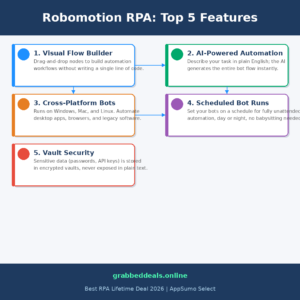
1. Visual Flow Builder
The canvas-based designer lets you connect pre-built nodes representing actions like ‘Open URL,’ ‘Type Text,’ ‘Read Excel Row,’ or ‘Send Email.’ You can see the entire workflow automation logic laid out visually, which makes debugging and handing off work to a team member surprisingly easy. No code required.
2. AI-Powered Flow Generation
This is the feature that got the most attention in the AppSumo community, and for good reason. You type what you want to automate in plain English, and the AI assembles a starting flow with connected nodes, logic branches, and error handling. It is not magic, you still review and tweak, but it cuts build time from hours to minutes for standard tasks.
3. Cross-Platform Robot Agent
The robot agent runs on Windows, Mac, and Linux. This matters for teams where everyone uses a different OS. More importantly, it can automate desktop applications that have zero API access, including old internal tools and legacy ERP systems that most automation tools simply cannot touch. This is the real differentiation from pure browser automation.
4. Bot Orchestration and Scheduling
Set any flow to run on a schedule, and Robomotion handles it completely unattended. The admin console shows you a live run history, execution logs, and error reports. You can manage multiple bots across different machines from one dashboard, which is exactly what you need once you have more than one process automated.
5. Vault-Based Credential Security
Passwords, API keys, and sensitive tokens are stored in an encrypted Vault and never appear in plain text inside your flow. For anyone automating logins to business platforms, this is not optional, it is a requirement. Robomotion handles it cleanly without needing a third-party password manager integration.
Robomotion in Action
The official AppSumo product demo below is the clearest 10-minute overview of how the flow builder actually works and what the admin console looks like in real use. Worth watching before you build your first flow.
Watch the official Robomotion demo on YouTube:
Robomotion RPA Alternatives
Before settling on Robomotion I looked at a few other options. Here is the honest comparison:
UiPath Community Edition
UiPath is the enterprise gold standard for UI automation and bot orchestration. It is powerful, deeply featured, and completely overkill for a small team. The free community tier comes with enough restrictions to make real production use difficult, and the paid plans start well into the thousands per year per robot.
Make (formerly Integromat)
Make is excellent for cloud-to-cloud automation between apps that have APIs. It is genuinely easier to learn than Robomotion. The problem: the moment you need to touch a desktop application, a browser without an API, or a legacy system, Make cannot help you. It is web-only by design.
Power Automate Desktop
Microsoft’s free tool covers basic desktop and browser automation on Windows. If your team is entirely on Windows and the Microsoft stack, it is worth trying. The flow logic is less intuitive than Robomotion’s canvas, and cross-platform support does not exist. For anything beyond Windows-only workflows, Robomotion wins on flexibility.
Our Verdict
If you are looking for the best no-code RPA tool for small businesses 2026, Robomotion delivers. The visual flow builder, AI assistance, and genuine cross-platform desktop automation put it ahead of anything else at this price point. Yes, there is a learning curve for complex flows. But once it clicks, it genuinely changes how you think about manual work. The $119 lifetime entry point makes trying it a low-risk decision.
Ready to grab the deal? Robomotion RPA on AppSumo More lifetime deals and guides
Frequently Asked Questions
Q: Is Robomotion RPA worth it in 2026? Yes, for anyone running repetitive desktop or web workflows. The AI flow builder has improved significantly, the cross-platform support covers all major operating systems, and the AppSumo community reports strong results for data entry, scraping, and document processing tasks. At $119 lifetime it is hard to argue against trying it.
Q: Does Robomotion have a free trial? Yes. Robomotion offers a 14-day free trial at robomotion.io so you can build and test flows before committing. The AppSumo deal also comes with a 60-day money-back guarantee through AppSumo’s refund policy.
Q: Who is Robomotion best suited for? Freelancers, small agency operators, operations managers, and solo founders who spend time on repetitive manual tasks but do not have the budget or technical resources for enterprise RPA platforms. Some JavaScript comfort helps for advanced flows, but basic automations are accessible to non-developers.
Q: How long is the lifetime deal available? AppSumo lifetime deals run for a limited window. Once the campaign closes, pricing reverts to a subscription model. The current deal is live but these campaigns do end, so checking the AppSumo page directly gives you the most accurate availability information.
Q: Can I get a refund on the lifetime deal? Yes. AppSumo offers a 60-day refund window on lifetime deals, so you can test the product thoroughly before the guarantee expires.
Q: Does Robomotion work on Mac and Linux, or just Windows? All three. The robot agent installs on Windows, Mac, and Linux. Flows built in the cloud-based Flow Designer run on whichever machine the agent is installed on, which makes it one of the few RPA tools with genuine cross-platform desktop automation support at this price.
Published by GrabbedDeals.online – Appsumo Deals | WP Themes & Plugins | DealFuel | Dealify | DealMirror | RocketHub | StackSocials | Others|