You know that moment when you are 30 minutes into a Zoom call and half the attendees have their cameras off, the chat is dead, and someone just said “can everyone hear me?” for the third time? That was every online training I ran in 2023. I tried switching things up with backgrounds and breakout rooms, but it still felt like a corporate waiting room.
Then I stumbled across GoBrunch while browsing AppSumo, and honestly it felt almost too good to be true. A virtual meeting tool that actually looks and feels like a real venue? I was skeptical. But after running a few webinars and community sessions on it, the difference was noticeable. People showed up. They stayed. They talked. Get Lifetime Deals on tools like this before they go back to monthly pricing.
What is GoBrunch?
GoBrunch is a browser-based virtual meeting platform built specifically for creators, educators, coaches, and small businesses who are tired of flat, disengaging video calls. It falls squarely in the virtual event software category, sitting between a traditional webinar tool like Zoom and an immersive space like Gather.town, but without the complexity of either.
What makes it different is the visual layout. Instead of a grid of floating heads, participants appear in styled circular seats arranged inside a fully branded virtual room. You pick from layouts like classrooms, auditoriums, coffee corners, and co-working spaces, then layer in your logo, colors, and custom backgrounds. It is one of the most thoughtfully designed virtual collaboration platforms with verified user reviews on G2.
GoBrunch is built for:
-
Online educators and coaches running live classes or group sessions
-
Small business owners hosting recurring team meetings or client webinars
-
Event organizers who want breakout rooms, networking spaces, and branded environments
How Does GoBrunch Work?
Getting started is surprisingly quick. Here is the basic flow for running your first session:
-
Create your space. Sign up at gobrunch.com, pick a use case (classroom, webinar, co-working, event), and your space is generated with a permanent URL you can reuse forever. No reinstalling, no new links every time.
-
Customize the room. Use the built-in editor to drag and drop seat circles, add your logo and branding, upload a custom background image, and even embed YouTube videos or Google Slides directly into the room.
-
Share the link. Send participants your space URL. They click it, allow mic and camera access in their browser, and they are in. No app download required on their end.
-
Run the session. As the host, you control every camera and microphone from a central panel. You can mute individuals, screen share with sound, spotlight a presenter, and move people into specific breakout rooms with a single click.
-
Review and record. Sessions can be recorded to cloud storage, and you get an attendance report after each event showing who joined, when, and for how long.
Tips for Using GoBrunch
Getting the most out of GoBrunch takes a bit of setup. Here are five things that made a real difference in my experience:
-
Design your room before day one. Most people open it on the day of their first session and wing the layout. Spend 30 minutes upfront customizing your seating arrangement and background. Attendees notice the effort, and it sets the tone immediately. For inspiration on branding your virtual space, the GoBrunch knowledge base has solid visual guides for room builders.
-
Use breakout rooms for anything over 15 people. Breakout rooms are where GoBrunch really shines compared to standard webinar software. Assign a co-facilitator to each room, send people in automatically, and everyone gets a smaller-group feel even inside a 200-person event.
-
Enable Picture-in-Picture mode during presentations. This is the feature most new users miss entirely. It lets you watch your slides and your attendees at the same time on screen, so you stop presenting into the void.
-
Connect Zapier for registration and follow-up workflows. GoBrunch integrates with Zapier, so you can push registration data into your email list, trigger confirmation messages, or update a CRM automatically. It takes about 15 minutes to set up and saves a lot of manual admin work.
-
Do not skip the secret key feature for private rooms. If you are running paid workshops or coaching groups, set a secret key on specific rooms so only paying members can enter. A common beginner mistake is leaving all rooms open and then scrambling to kick out uninvited guests mid-session.
GoBrunch Review: Pros and Cons
GoBrunch is genuinely impressive for its category, but it is not perfect. Here is an honest breakdown after real use.
Pros
-
No downloads required for hosts or attendees, removing a major friction point for non-technical audiences
-
Fully branded rooms with logo, custom backgrounds, and your own CNAME subdomain on higher tiers
-
Breakout room management is genuinely better than Zoom’s implementation for events and classes
-
Community membership features with Stripe payments built in, so you can monetize directly from the platform
-
4.8 stars across 323 AppSumo reviews, with consistent praise for the engaging room experience
Cons
-
Mobile experience, while improved, still lags behind the desktop version for some host controls
-
The room editor has a learning curve; first-time users may find it overwhelming without checking the help center
-
Video storage limits apply at lower tiers (40 GB on Tier 1), which adds up quickly if you record every session
Top 5 Features of GoBrunch
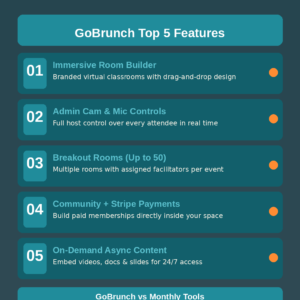
1. Immersive Virtual Room Builder
GoBrunch’s room customization is the standout feature. You can build a fully branded virtual classroom, auditorium, or co-working space with drag-and-drop tools, custom images, embedded video content, and portrait-mode layouts for mobile attendees. This is the feature that actually reduces meeting fatigue because participants feel like they are somewhere, not just staring at a grid. The visual design aspect alone sets it apart from traditional webinar platforms.
2. Full Admin Controls for Cams and Mics
The host dashboard gives you control over every camera and microphone in the room. Mute a noisy background, spotlight the active speaker, or lock down all mics during a presentation with one click. Chat moderation tools let you keep sessions focused without losing your train of thought mid-presentation.
3. Breakout Rooms with Multiple Facilitators
GoBrunch supports up to 50 breakout rooms per event on Tier 3, each with its own assigned facilitator. You can broadcast to all rooms simultaneously, move attendees between spaces, and hide specific rooms from navigation until they are needed. This level of control over session management is a standout capability for webinar software in this price range.
4. Community Membership with Stripe Payments
The community membership feature lets you build a paid subscriber base directly inside GoBrunch. Set up landing rooms for members, create promo rooms for non-members, collect payments via Stripe, and restrict room access by email list. This transforms GoBrunch from a meeting tool into a full community platform without needing a separate membership site, which is a significant cost saving for creators.
5. On-Demand Video and Async Content
Beyond live sessions, GoBrunch rooms can host uploaded MP4 videos, Google Docs, Slides, and embedded content that participants can access at any time. This async layer makes it useful for 24/7 community spaces, self-paced course delivery, and asynchronous team hubs. The ability to blend live collaboration with on-demand content gives it a genuine edge over tools that only handle scheduled calls.
GoBrunch in Action
The best way to see why GoBrunch feels different from standard video tools is to watch a real session in action. The official demo below walks through room setup, the host control panel, and breakout room management, giving you a clear picture of what your attendees will actually experience.
GoBrunch Alternatives
Zoom Webinars
Zoom is the obvious comparison, and for raw reliability and name recognition it still wins. But Zoom Webinar pricing starts at $149/month for 500 attendees, and the experience is fundamentally a talking-heads grid. No branded rooms, no immersive layouts. For recurring community-led events where attendee engagement matters, GoBrunch delivers far more personality per dollar.
Hopin (RingCentral Events)
Hopin was an early leader in virtual event platforms with expo halls and networking zones, suited for large enterprise conferences. After its acquisition by RingCentral, pricing has shifted heavily toward enterprise tiers. For small businesses and independent creators managing virtual classrooms and coaching events, the cost and complexity are hard to justify when GoBrunch covers the same ground at a fraction of the price.
Gather.town
Gather.town is GoBrunch’s closest spiritual sibling in terms of spatial, immersive meeting spaces and works well for virtual offices and social hangouts. GoBrunch edges it out for webinar and classroom use cases specifically because of its structured admin tools, cloud recordings, attendance reports, and Stripe-based community membership features.
GoBrunch Lifetime Deal: Our Verdict
GoBrunch is one of the most genuinely differentiated virtual meeting tools available right now. It does not try to replace Zoom entirely. Instead it solves a specific and painful problem: keeping remote audiences engaged when everyone is fighting screen fatigue, disengaged attendees, and the general grind of back-to-back video calls.
If you are looking for the best virtual meeting platform for online educators and community builders in 2026, this deal delivers real value. Tier 1 at $89 works well for solopreneurs and small groups. Tier 2 at $199 is the sweet spot for coaches and event organizers needing up to 400 attendees, sub-accounts, and custom branding. Tier 3 at $269 suits agencies and established community businesses managing large audiences.
Ready to grab the deal? Get GoBrunch on AppSumo
Frequently Asked Questions
Q: Is GoBrunch worth it in 2026? For anyone running regular virtual events, classes, or community sessions, yes. The lifetime deal undercuts comparable monthly subscription tools significantly, and the immersive room experience genuinely improves audience retention over standard video conferencing grids.
Q: Does GoBrunch have a free trial or free plan? GoBrunch offers a free tier with limited participants and features, which is useful for testing the platform before committing. The AppSumo lifetime deal tiers unlock higher attendee limits, more storage, branded rooms, and community features not available on the free plan.
Q: Who is GoBrunch best suited for? Course creators, online coaches, community managers, and event organizers hosting groups of 20 to 600 people on a recurring basis. It is also a strong pick for startups wanting a branded virtual office without enterprise overhead.
Q: How long is the GoBrunch lifetime deal available? AppSumo lifetime deals run for a limited window with no publicly announced end date. Once the campaign closes, pricing is expected to revert to a recurring subscription model, so acting sooner reduces the risk of missing out.
Q: Can I get a refund on the GoBrunch lifetime deal? Yes. AppSumo offers a 60-day money-back guarantee on all lifetime deals, giving you two months to test it properly before the purchase becomes final.
Q: Can I use my own domain or branding with GoBrunch? Yes. Tier 2 and Tier 3 plans include custom CNAME subdomains (e.g., meetings.yourcompany.com), letting you white-label the experience for clients or community members. Tier 1 includes full room branding with logos and backgrounds but without a custom subdomain.
Published by GrabbedDeals.online – Appsumo Deals | WP Themes & Plugins | DealFuel | Dealify | DealMirror | RocketHub | StackSocials | Others|